Drive Letter Utility is a lightweight Windows app that lets you manage drive letters and drive labels quickly, without opening Disk Management or fiddling with the command line. Just select a drive, make your change, and it’s applied right away.
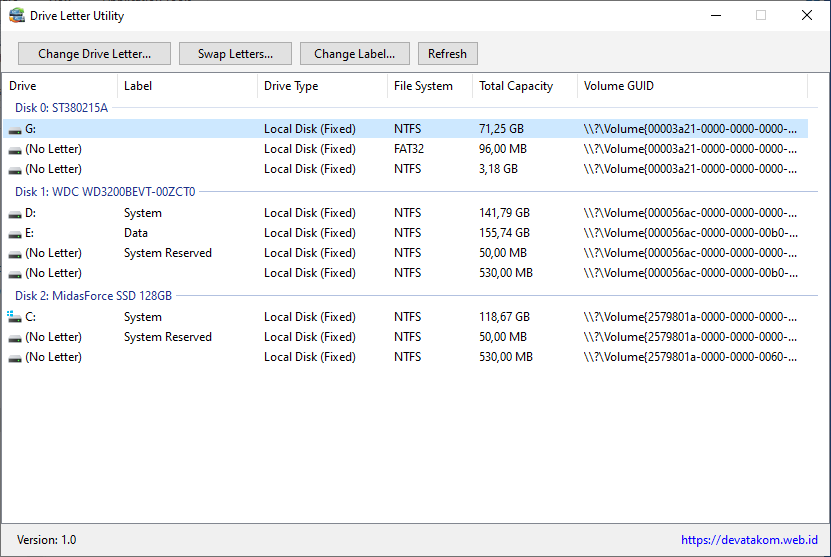
Key Features
Change Drive Letter
Reassign a drive to any available letter. Great for tidying up your drive order, matching an older configuration, or fixing programs that depend on a specific path.
Swap Drive Letter
Exchange the letters of two drives in a single click. No need to use a temporary letter as a go-between, as you would when doing it manually.
Change Drive Label
Rename a drive’s volume label so it’s easier to recognize, such as “Data,” “Backup,” or “Games.”
Why You’ll Like It
- Simple, easy-to-understand interface
- Fast: just a few clicks
- Small footprint with no strain on your system
- Shows all your drives, with their letters and labels, in one view
Use Cases
- Organizing your drive layout after installing a new HDD, SSD, or flash drive
- Adjusting drive letters on multiboot systems
- Fixing shortcuts or programs that stopped working because a drive letter changed
- Giving drives clear names to stay organized
| Name | Drive Letter Utility |
| Version | 1.0.0 |
| Release Date | 09/11/2026 |
| System | Windows 7 or newer |
| Download | DriveLetterUtility1.0 |
CHANGELOG
Version 1.0 (09/11/2026)
- First release
