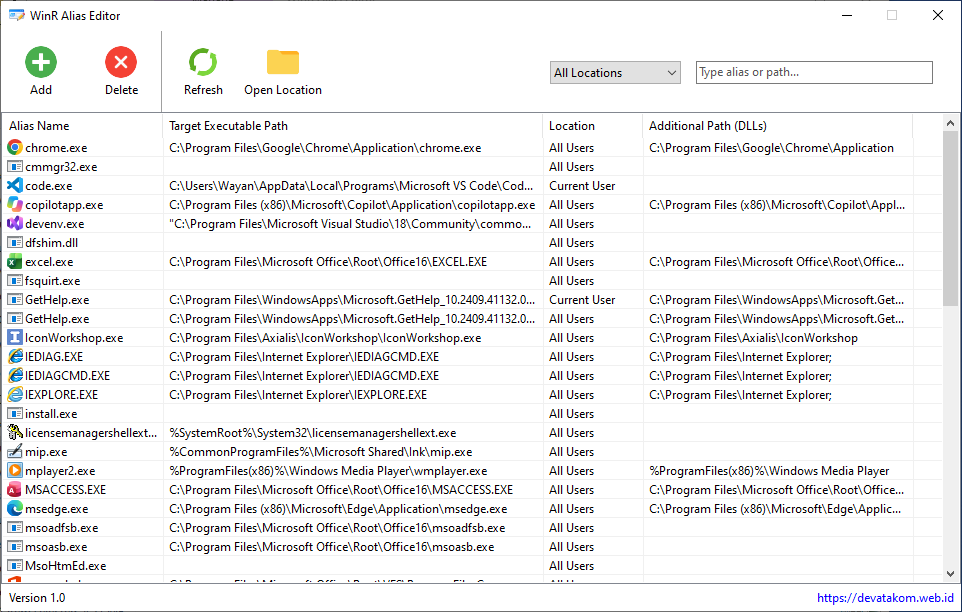
WinR Alias Editor is a lightweight Windows application that allows you to create and manage aliases (shortcuts) for opening applications, folders, or files directly from the Run dialog (Win + R). No more typing out long file paths or searching for shortcuts—simply type a short alias, press Enter, and the program opens instantly.
Key Features
- Add aliases: Select an application (.exe) and assign it an easy-to-remember alias—for example, “ps” for Photoshop or “chrome” for Google Chrome.
- Remove aliases: Delete aliases you no longer need with a single click.
- Alias list: View all your aliases and their corresponding target application paths in one place.
- Instant activation: Aliases are ready to use in the Win + R dialog immediately, with no need to restart Windows.
- Lightweight and simple: Features a clean, user-friendly interface and does not run continuously in the background.
How It Works
The application registers aliases within the Windows Registry under “App Paths”—the official mechanism Windows uses to recognize program names in the Run dialog. This ensures that your aliases remain secure and stable, without modifying any system files.
| Name | WinR Alias Editor |
| Version | 1.0.0 |
| Release Date | 09/11/2026 |
| System | Windows 7 or newer |
| Download | WinR Alias Editor 1.0 |
CHANGELOG
Version 1.0 (09/11/2026)
- First release
